Social listening for solo founders: a simple daily routine on X
A plain guide to social listening for solo founders: turn your customer's problems into X searches, read them daily, and reply with real help.
Social listening for solo founders means reading public posts to find people who describe a problem your product solves. Then you reply with real help. You can start today on X with a few saved searches and a short daily session. You do not need a paid tool.
This guide shows you how, step by step.
What social listening means for a solo founder
Start with the problem your product solves. Searching for your brand name alone may miss people who have never heard of you.
Many people may be talking about the problem you solve, though. Some of them ask for help. Those posts are a good place to look for your first customers.
For you, social listening means one thing: find the people who have your customer's problem right now.
Brand monitoring vs. listening for buyers
- Brand monitoring looks for your name. It helps when people already know you.
- Listening for buyers looks for a problem. It helps when nobody knows you yet.
If you search for your product name today, you may find nothing. If you search for the words your customers use to describe their pain, you may find people asking for help this week. Start with the problem.
Step 1: Write your customer's problem in their words
First, picture your ideal customer. Some founders call this the ICP, short for "ideal customer profile." It means the person most likely to need and buy what you built. Describe them in one sentence.
Next, write the problem the way that person would say it. Do not copy the words from your landing page.
Example (fictional niche): You built a pricing tool for Etsy candle makers. Your list of pain phrases might look like this:
- "how much should I charge for candles"
- "candles not selling"
- "pricing my candles"
- "is my candle price too low"
Aim for 5 to 10 phrases. Short ones are easier to search. Think about what a tired person types late at night.
Step 2: Turn each phrase into an X search
Open the free X search builder. Each field of the builder writes one operator. An operator is a short bit of text that adds a rule to a search, such as which words to leave out.
Start with one pain phrase. For the fictional candle-pricing niche, fill in these fields:
- Choose Questions.
- Put pricing my candles in Exact words, in order.
- Put giveaway in Leave out.
- Under More filters, choose English for the language and Hide for links.
Example: the builder filled with a fictional customer's problem.
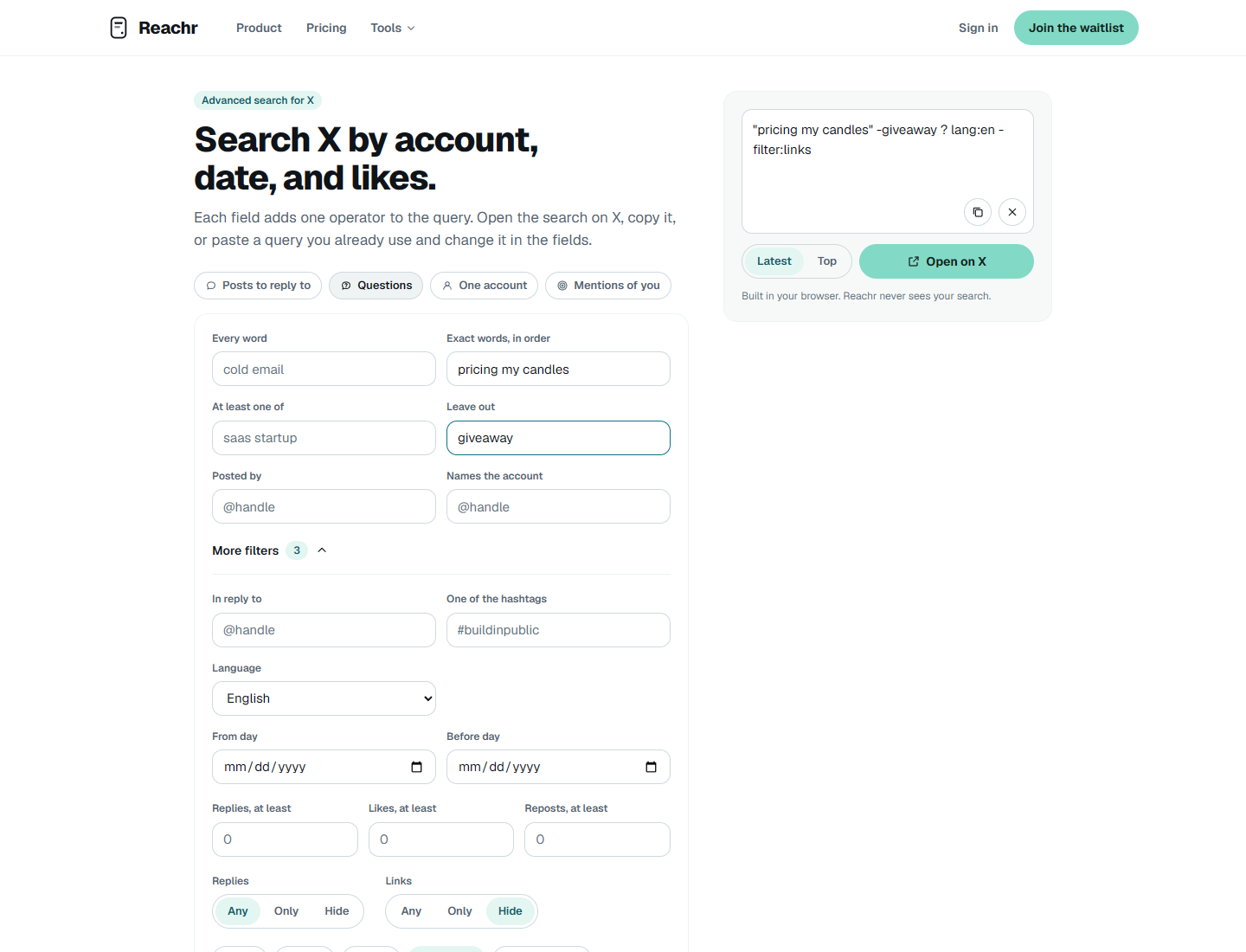
The builder produced this query for the example:
"pricing my candles" -giveaway ? lang:en -filter:links
This shows the search we built, not a set of search results. Choose Open on X, read the posts, and check whether they match the problem you had in mind. If the search is too narrow, remove one filter and try again.
Start with 3 to 5 searches, each based on a different phrase. Bookmark the ones that find useful posts. You can add more after you learn which phrases work for your niche.
Step 3: Run a short daily listening session
Pick a set time each day. Keep it short, maybe 15 to 20 minutes. Then:
- Open each bookmarked search and look for recent posts.
- Skim fast. You are looking for a real person with a real problem.
- Mark the posts worth a reply. Skip the rest without guilt.
Worth a reply: a clear question, a real pain, a recent post.
Skip: jokes, rants with no question, ads, and posts where your help would not fit.
On many days, a few good posts are enough.
Step 4: Reply with help first
This is the most important step. Your reply should help even if the person never clicks your link.
A good reply often has three parts:
- Answer the question or name the likely cause.
- Give one concrete next step.
- Mention your product only if it is truly the fix.
Example reply (fictional): "Have you counted wax waste and packaging? Add those to your cost before you set a price. I built a small calculator for this. Happy to share if it helps."
Avoid these:
- Copy-paste replies. Readers can tell, and they look like spam.
- Dropping a link with no help.
- Replying to every post in a thread with the same pitch.
A simple test (general advice): read your reply with the link removed. If it still helps, it is probably worth sending. If it says nothing without the link, rewrite it.
Step 5: Keep a simple log
Listening works best when you learn from it. Keep a plain spreadsheet with these columns:
- Date
- Link to the post
- What you said
- Did they reply?
- Did anyone visit your site or sign up?
Count a waitlist signup as a lead. Track paid customers separately. After two or three weeks, look at the log. Which searches found the best people? Which kind of reply got answers? Keep what works and drop what does not.
When a tool helps
The manual routine works, but it takes time every day. Some parts are good to automate:
- Running the same searches each day
- Sorting posts that fit your product from posts that do not
- Writing a first draft of a reply
Some parts you should always do yourself:
- Choosing who to reply to
- Editing every reply so it sounds like you
- Deciding what goes out
This is the job we are building Reachr for. Reachr finds posts on X about problems a user's product solves and drafts replies for the user to edit. Reachr can also score drafts and schedule posts that the user approves. You can watch a short walkthrough on the Reachr home page.

If you would like to try Reachr when it opens, you can Join the waitlist. The manual routine above still works on its own.
FAQ
Do I need a paid social listening tool?
Start with the manual routine above. Use it to learn which searches and replies are worth your time before you decide whether to pay for a tool.
How many searches should I keep?
Start with 3 to 5. With fewer searches, you are more likely to read them all. Add more only when your log shows a phrase finds good people.
What if my niche barely posts on X?
Try broader phrases first, and remove strict filters. X search is not a full archive. It leaves out deleted posts, posts from protected accounts, and posts from accounts that X limits. (X search builder) If you still find very little after a week, your customers may talk somewhere else. The same method works in forums and communities too: write their words, search for them, and help first.